"Man, I wish I could track who this custom projectile hit!" "I wish there was an easy way to track projectiles"
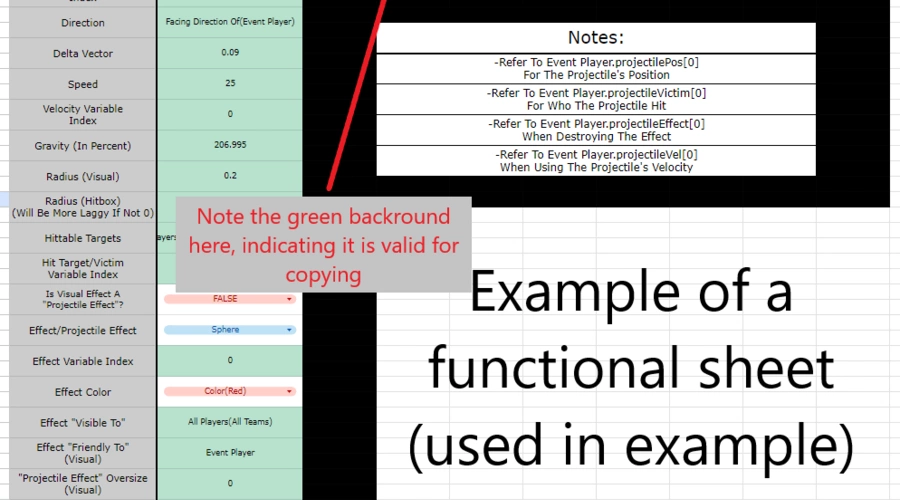
Well, now there is! simply paste the mixin from here & paste it in your mode, make a copy of this form, enter in your info, and copy + paste the text! (Mixin is in snippet)
Notes:
- The created projectile cannot be tracked by DM or Deflect
- The mixin pauses the action list of the current rule until the projectile has collided/timed out
- The indexes of the various variables need to be different if one player is able to make/track 2 projectiles at the same time
- The rule has to have an event player for this to work properly, and the variables will link to the event player
- A zero hitbox radius will use 1 ray cast in a while loop, but a non-zero hitbox radius uses 4.
submit feedback in comments, I'd love to see what everyone thinks of this!








6 Comments
question, is there a way to make this work using overpy, not using workshop.codes editor? Or im missing out and overpy already has a mixin or sum
no, I could see if someone wanted to translate it though, if OP has mixins
Maybe like subroutine and a variable that contains the settings? I'm unsure if it'll be viable though.
yeah that could work, also make it console compatible. so like define the variables then run the subroutine that makes the proj based on those vars
Gotcha, ill see what I can do.
Not the greatest approach with variables considering more than 10 is used, I was thinking maybe an index, one variable multiple settings.