

This code is over 6 months old. The code may have expired and might no longer function.

View original size
A Super Customizable Aim Trainer
Features
- Projectile guide - Learn to lead projectiles
- Pressure mode - Bots shoot back with customizable accuracy
- Custom spawn location - Train on any location on any map. Multiple spawn bots for bots.
- Reactive bots - Bots will react to your actions
- Customizable movement - Configure strafe pattern, frequency, and movement speed
- In-game menu - Make small adjustments to your game quickly without need to restart the mode.
- Offensive, defensive, and ultimate ability usage for nearly every hero.
In-Game Menu
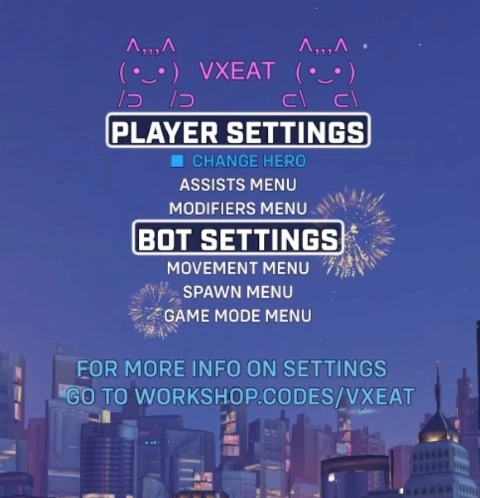
Player Settings
These settings are available to all players in the lobby.
| Menu Option | Description |
|---|---|
| Change Hero | Return to hero select screen. |
Player Assists
| Menu Option | Description |
|---|---|
| Projectile Guide | Cycle through abilities to display an orb showing where to lead the ability projectile, based on the bots current velocity. |
| Mercy Damage Boost | Toggles Mercy's damage boost effect on the player. |
| Nano Boost | Toggles Ana's nano boost effect on the player. Inaccurate damage reduction when stacking DR abilities. |
| Kitsune Rush | Toggles Kiriko's kitsune rush. Refreshes until disabled. |
| Show Recall | A light shaft will appear at a bot Tracer's recall location when she casts the ability. |
Player Modifiers
| Menu Option | Description |
|---|---|
| Player Movement Speed | Select the percentage of speed to apply to the player. Use large step to select from movement speed boosts possible in a real game. |
| Infinite Ammo | Toggle for max ammo. Will insta-reload at 1 ammo. |
| No Strafe Stun | Stuns the player if they have not changed strafe directions in the selected number of seconds. Cycle through time before being stunned. Corse and find grain control. |
| Headshot Only Mode | Bots will only receive headshot damage. BUG: If the damage will result in a final blow the headshot only requirement will ignored. |
Bot Settings
These settings are only avalaible to the host.
Bot Movement
| Menu Option | Description |
|---|---|
| Bot Strafe Pattern | Cycle through different strafe patterns. |
| Min Distance (Hidden) | Cycle through the minimum distance bots can path near you when using the custom distance strafe option. |
| Max Distance (Hidden) | Cycle through the maximum distance bots can path away from you when using the custom distance strafe option. |
| Fixed Points (Hidden) | Cycle through the number of points on a circle bots path to when using the fixed shapes strafe option. |
| Bot Strafe Difficulty | Cycle through difficulty options that change the frequency at which bots change strafe directions. |
| Min Strafe Wait (Hidden) | The minimum time to wait before bots have a chance at change strafe directions when using the custom strafe difficulty. |
| Max Strafe Wait (Hidden) | The maximum time to wait before bots have a chance at change strafe directions when using the custom strafe difficulty. |
| Bot Strafe Speed | Select the percentage of speed to apply to bots. Use large step to select from movement speed boosts possible in a real game. |
| Bouncing Bots | Cycle through the magnitude of impulse applied to bots when they are on the ground. |
Bot Spawn
| Menu Option | Description |
|---|---|
| Number of Bots | Cycle the number of bots to spawn, up to 12. |
| Spawn Type | Toggle between having bots spawn withw the same position, radius and hero pool, or letting each bot have their own custom spawn variables. |
| Bot Slot (Hidden) | The slot of the bot you would like to configure when using the multipoint spawn mode. Starts at 0. |
| Hero Pool / Slot X Hero Pool | The hero pool for the bots. If in multipoint mode, the hero pool will be specific to the bot at the set slot. |
| Spawn Radius / Slot X Spawn Radius | Cycle the radius of the area that the bots can spawn in. Affects the pathing for the default and long-strafe settings. |
| Set Spawn Point / Set Slot X Spawn Point | Sets the spawn location of the bot / bot in slot X. |
Game Modes
| Menu Option | Description |
|---|---|
| Pressure Mode | Cycle to start a game mode where the bot closest to your crosshair will attack you, if in line of sight. And additional mode is avaible where the bots are immortal. Additional stats will be added to the top left HUD. |
| Pressure Accuracy (Hidden) | Cycle how likely the bot will aim direct at you, and if the bot is going to miss, how narrow of a margin that the miss is. |
| Speed Mode | Causes the bot's movement speed to increase after every elimination. |
| Speed Timer (Hidden) | Cycle the time to wait before decrementing the speed multiplier. The timer resets to this value after every elimination. |
| Increment Step (Hidden) | Cycle the amount of speed percentage to add after every elimination. |
| Decrement Step (Hidden) | Cycle the amount of speed percentage to remove after the timer runs out. |
| Kill Target (Hidden) | Cycle the number of kills until the speed increments. |
Controls
PC Controls
| Button | Action |
|---|---|
| Ability 2 | Select menu item. |
| Forward | Move up one on the menu. |
| Backward | Move down one on the menu. |
| Left / Right | Cycle the selected menu item. Allows for fine grain control on certain menu options. |
| Ultimate / Ability 2 | Cycle the selected menu item. Allows for corse control on certain menu options. |
Console Controls
| Button | Action |
|---|---|
| Ability 2 | Select menu item. |
| Ultimate | Move up one on the menu. |
| Jump | Move down one on the menu. |
| Ability 1 / Ability 2 | Cycle the selected menu item. Allows for fine grain control on certain menu options. |
| Secondary Fire / Primary Fire | Cycle the selected menu item. Allows for corse control on certain menu options. |
Feature Tutorials
Custom Aim Training Location
Using the Set Custom Spawn Point option you can set bots to spawn at any point on any map. Perfect for practicing cover usage and shooting at different elevation.
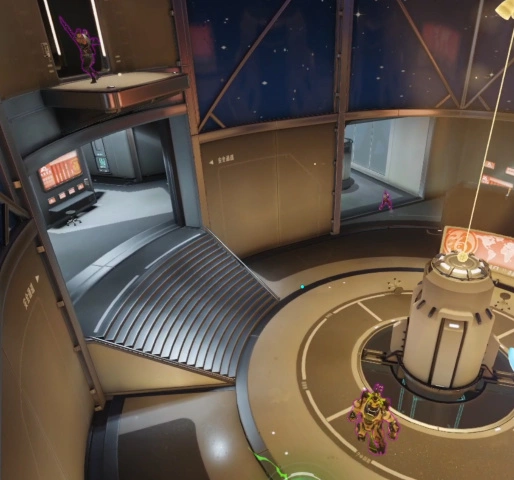
Single Point Spawn
- Import this code into a custom game lobby.
- Select the map tile in the custom game settings menu.
- Scroll to the map you wish to practice on, and toggle the off button to on. To select a specific point on a control map return to the settings menu, select the modes tile, then the skirmish tile, then assign "Limit Valid Control Points" to the point you would like to practice on.
- Start the game mode.
- Select a hero.
- Navigate to the center location where you would like your bots to spawn.
- Press Interact to open up the menu.
- Scroll down the until Open Spawn Menu and select it.
- Scroll down to Set Spawn Point and select it.
- Press Interact to close the menu.
- The bots will now respawn at the location you have assigned.
- You can change the radius of the spawn area by scrolling up and selecting cycling through the distance.
Multipoint Spawn
You can also set bots to have unique spawn points, radii, and hero pools for each slot.
- Import this code into a custom game lobby.
- Select the map tile in the custom game settings menu.
- Scroll to the map you wish to practice on, and toggle the off button to on. To select a specific point on a control map return to the settings menu, select the modes tile, then the skirmish tile, then assign "Limit Valid Control Points" to the point you would like to practice on.
- Start the game mode.
- Select a hero.
- Navigate to the center location where you would like your bots to spawn.
- Press Interact to open up the menu.
- Scroll down the until Open Spawn Menu and select it.
- Scroll down to Spawn Type and select it. It should say Multipoint Spawn.
- A new menu option Bot Slot will appear. Use this to select which bot you would like to configure.
- Configure the hero pool, spawn radius, and spawn point for the bot at the slot you selected.
- Repeat steps 10 and 11 for each bot in the lobby.
- Press Interact to close the menu.
- The bots will now respawn at the location you have assigned.
Leading Target for Projectile Abilities
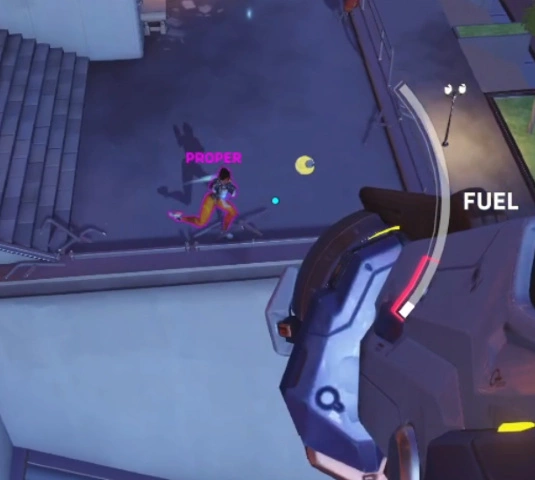
Using the Projectile Guide option creates a predictive target for projctile aim.
- Import this code into a custom game lobby.
- Start the game mode.
- Select a hero.
- Press Interact to open up the menu.
- Scroll down the menu until Open Assists Menu is highlighted and select it.
- Scroll down until Projectile Guide is highlighted and use cycle to select which ability you would like to practice. If the text is highlighted green, then the selected ability is a projectile for your hero, and the the speed of the projectile will be displayed. If the text is highlighted red, the selected ability is not a projectile for the hero you selected.
- Press Interact to close the menu.
- A black dot outlined by a yellow orb should now appear near the target closest to your crosshair. Aiming for the black dot will result in a hit, assuming the target does not change the direction it is strafing.
- Note: The target aims for the targets camera, which may slightly different from the targets crit box.
- Bug: The target is slightly too low for arcing projectiles at ranges greater than 20 meters.
Bots Shoot at You During Training (Pressure Mode)
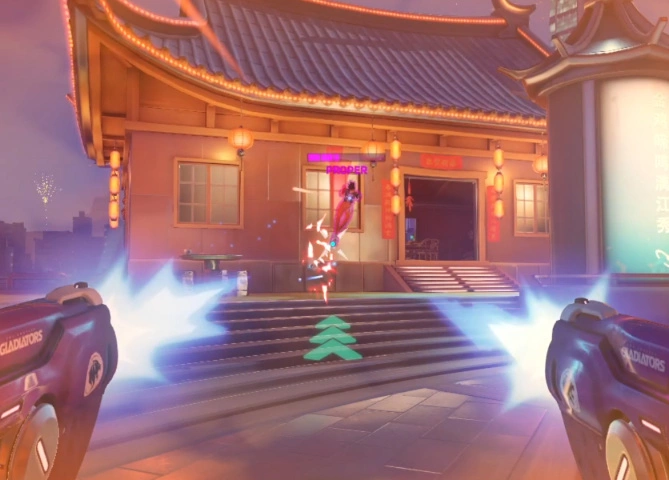
- Import this code into a custom game lobby.
- Start the game mode.
- Select a hero.
- Press Interact to open up the menu.
- Scroll down until Game Modes is highlighted.
- Scroll down the menu until Pressure Mode is highlighted.
- Toggle this setting on. Toggle again to make the bots unkillable.
- Scroll down to pressure accuracy and cycle through to select how accurate the bots are. The difficulty level scales exponetially.
- All heroes will read your movement and when aiming, and have a higher likelyhood of overshooting than undershooting.
- Projectile heroes will lead their shots when aiming for you.
- Bots will use offensive abilities if the setting "Use Abilities" is set to true under the Bot Movement menu option.
- Bots will use react to your input if Bots React is set to on in the workshop settings menu.
- Bots will use defensive abilities and ultimates if enabled in under the setting 8.x. in the workshop settings menu.
- By default this code has no cooldowns for abilities. If you want to use this setting I recommend setting under 'Heroes -> General -> Ability Cooldown Time' to 100% so that your cooldown timers will be similar to an actual game.
- Also note that Echo's flight and Doomfist's slam are set to 10% by default because of a weird interaction when canceling these abilties with 0% cooldowns. If practicing these heroes go to 'Heroes -> Doomfist / Echo-> Seismic Slam Cooldown Time / Flight Cooldown Time' and set them to 100%
Workshop Settings Menu
UI Settings
| Setting | Description |
|---|---|
| Show HUD (Disable to allow for player settings for a second player) | Toggle to text that appears when the menu is off. |
| Console UI | A toggle to switch the UI configured for console. |
| Show Damage Numbers | Show Damage Numbers above the targeted bots head. |
| Show Server Load and Coordinates | Shows the server load and the player's current coordinates. Useful for getting the numbers for the Custom Bot Spawn setting. |
Number of Bot Setting
| Setting | Description |
|---|---|
| Number of Bots | The default number of bots that will spawn when you start the game mode. |
Bot Ability Settings
| Setting | Description |
|---|---|
| Bots will use abilities | Toggle for bots to use abilities. |
| Bots React | Bots will read the players input and have a chance of using their own abilities in response. |
| Multiplier for Bots React | Modifies how likely bots will use their abilities in response to thei player's input |
| Multiplier for Bot Abilities | Modifies how often bots their abilities. |
| Multiplier for Bot Ultimates | Modifies how often bots use their ultimates. The default is a 30% chance every 10 seconds for most bots. |
Bot Movement Settings
| Setting | Description |
|---|---|
| Strafe Pattern | The type of strafe pattern you would like bots to use. |
| Difficulty | How often bots swap strafe directions. |
| Bot Movement Speed | Set the percent speed of the bots from 0% to 1000%. |
Bot Movement Modifiers Settings
| Setting | Description |
|---|---|
| Bot Jumping | Toggle for bots to randomly jump. |
| Bot Jumping - Minimum Wait | The min time for a bot to wait before jumping. |
| Bot Jumping - Maximum Wait | The max time for a bot to wait before jumping. |
| Bot Crouching | Toggle for bots to randomly jump. |
| Bot Crouching - Minimum Wait | The min time for a bot to wait before crouching. |
| Bot Crouching - Maximum Wait | The max time for a bot to wait before crouching. |
| Bot Uncrouching - Minimum Wait | The min time for a bot to wait before uncrouching. |
| Bot Uncrouching - Maximum Wait | The max time for a bot to wait before uncrouching. |
| Custom Strafe Pattern - Minimum Wait | The min time for a bot to wait before changing direction in the 'long strafe / custom' difficulty. |
| Custom Strafe Pattern - Maximum Wait | The max time for a bot to wait before changing direction in the 'long strafe / custom' difficulty. |
| Custom Distance Minimum Distance | The closest bots are allowed near the player with the Custom Distance pattern. Can be bugged by map geometry. |
| Custom Distance Maximum Distance | The farthest bots are allowed away from the player with the Custom Distance pattern. Can be bugged by map geometry. |
| Fixed Shapes Points | The number of points bots should path for the fixed shapes movement options. |
| Bouncing Bots | The magnitude for bots to bounce when on the ground. 0 = off. |
| AD Strafe Relativity | Lets you select the relativity of the bots movement when using AD strafes. To Player will act as if the bot is inputing A or D while tracking the player, resulting in an arcing motion. To World will cause the bots to move left and right globally, resulting in the bots moving left and right in straight lines, more similiar to how players AD strafe in real games. |
Pressure Mode Settings
| Setting | Description |
|---|---|
| Bots Apply Pressure | A toggle for the pressure mode to be enabled when starting the game mode |
| Bots Pressure Accuracy | The accuracy of the bots applying pressure. Accuracy determines the chance a bot has to shot directly at the player's eye level. If the bot is supposed to miss, accuracy determines the degree of error the bot makes based off the player's movement. Difficulty sales exponentially. |
Pressure Mode Modifier Settings
| Setting | Description |
|---|---|
| Eliminations Reset Cooldowns | Killing a bot will restore your health and reset all of your cooldowns, if supported by the workshop. Makes practicing 1v1s more fair. |
| Reset Health After Not Taking Damage | Resets your health to full after not taking damage for 4 second in the killable bots pressure mode. |
| Punish Player Deaths | The player is stunned for 0.5 seconds and the attacker is healed to full when the player dies in the killable bots pressure mode. |
Speed Mode Settings
| Setting | Description |
|---|---|
| Increment Bot Movement Speed Every Elimination (JPYHG) | Increase bot movement speed after every elimination, similar to ioStux's DPO Aim Trainer |
| Speed Mode Timer | How long to wait before going down a level. |
| Speed Mode Base Speed | The starting and lowest speed possible for speed mode. |
| Speed Mode Increment Percent Amount | The percent amount to increase bot speed after an elimination. |
| Speed Mode Decrement Percent Amount | The percent amount to decrease bot speed after failing to achieve an elimination within the time limit. |
| Reduce Strafe Distance Relative to Speed | Adjusts the strafe time so that high speed scores don't result in long strafes. |
Custom Spawn Settings
| Setting | Description |
|---|---|
| Use Custom Spawn Point | A toggle to use the default spawn settings or customized spawn settings. |
| Spawn Size | The custom radius bots attempt to traverse. |
| Spawn x coord | The x coordinate of the custom spawn location. |
| Spawn y coord | The y coordinate of the custom spawn location. |
| Spawn z coord | The z coordinate of the custom spawn location. |
| Use Multipoint Spawn | Lets you save a preset with multipoint spawns enabled. Since letting you configure the multipoint spawn in the settings page would exceed workshop limitations, you have to edit the rule at the very top of the workshop to configure the multipoint spawn settings. |
Bot Tank Heroes Settings
- Toggles for all Tank heroes to be included in the hero pool when first starting up
Bot Damage Heroes Settings
- Toggles for all Damage heroes to be included in the hero pool when first starting up
Bot Support Heroes Settings
- Toggles for all Support heroes to be included in the hero pool when first starting up
Bot Behavior Settings
| Setting | Description |
|---|---|
| Enable All Abilities | Enables all bot abilities and ultimates regardless of what they are set to in the menu. |
Bot Tank Hero Behavior Settings
- Menus to select which abilities should be enabled for every tank hero. Defensive abilities and ultimates disabled by default.
Bot Damage Hero Behavior Settings
- Menus to select which abilities should be enabled for every damage hero. Defensive abilities and ultimates disabled by default.
Bot Support Hero Behavior Settings
- Menus to select which abilities should be enabled for every support hero. Defensive abilities and ultimates disabled by default.
Misc. Functions
- When not using pressure mode Zarya will generate charge when using her personal bubble.
- When not using pressure mode and facing a bot, Doomfist will generate charge for his power block.
Bot Strafe Pattern Explaination
| Setting | Description |
|---|---|
| Random | Randomly cycles between the next 4 options. |
| Seita | A recreation of the movement seen in vaxta, adapted to work with custom spawn points. |
| Seita w/ long strafes | The same as above, but every time the bots swap strafe directions there is a 20% chance that the bots strafe for longer than the difficulty setting assigned. The idea is to mess with your ability to predict when the bot is going to swap strafe directions. |
| AD Strafes | Classic ADAD spam. Ignores the boundaries of the spawn radius after the bot is spawned. |
| Custom Distance | Similar to Seita's Pathing, except bots will simply input 1 of the 8 possible strafe directions on keyboard. Allows you to set a minimum and maximum range for bots to path between. Ignores the boundaries of the spawn radius after the bot is spawned. |
| Fixed Shapes | Bots will path between a number of points on a circle. Allows you to set the number of points up to 100. Use spawn radius to change the size of the shape. |
| No Movement | Bots don't move. They will still jump, crouch and use abilities if enabled. |
| Forward AD Strafes | Bots AD strafe towards a player. I don't recommend this setting for general practice but the code for it is used for certain bot abilities so I thought I might as well leave it as an option if someone might have a specific senario they want to practice. Ignores the boundaries of the spawn radius after the bot is spawned. |
| Forward Movement | Same as above, except the bots just press W key. |
Discord
- Report bugs on my discord: discord.gg/YPQ5ETNT45
Github
- Workshop mode created with OverPy
- You can find the script to compile the workshop mode yourself here: https://github.com/a-bella-ciao/VXEAT-OW2-Aim-Trainer
Credits
- VAXTA - Seita's original aim trainer
- GGSYK - Kiriko and Sojourn ability usage
- KJRR5P - Predictive projectile trainer by Yurodd
- JPYHG - ioStux DPO Aim Trainer
Sources
This post utilizes other codes either in part or in full. This could be because they remixed them, used parts of them, were inspired by them, or other reasons.
Players |
1 - 4
Created at:
Last updated:
Current version:
4.4
Controls
Interact
Open Menu (PC / Console)
Foward
Scroll Up Menu (PC)
Backward
Scroll Down Menu (PC)
left
Select / Small Left Step (PC)
right
Select / Small Right Step (PC)
Ultimate
Select / Large Left Step (PC)
Ability 2
Select / Large Right Step (PC)
Ultimate
Scroll Up Menu (Console)
Jump
Scroll Down Menu (Console)
Ability 1
Select / Small Left Step (Console)
Ability 2
Select / Small Right Step (Console)
Secondary Fire
Select / Large Left Step (Console)
Primary Fire
Select / Large Right Step (Console)

Open Menu (PC / Console)
Foward
Scroll Up Menu (PC)
Backward
Scroll Down Menu (PC)
left
Select / Small Left Step (PC)
right
Select / Small Right Step (PC)

Select / Large Left Step (PC)

Select / Large Right Step (PC)
Scroll Up Menu (Console)

Scroll Down Menu (Console)

Select / Small Left Step (Console)
Select / Small Right Step (Console)

Select / Large Left Step (Console)

Select / Large Right Step (Console)

Open Menu (PC / Console)
Foward
Scroll Up Menu (PC)
Backward
Scroll Down Menu (PC)
left
Select / Small Left Step (PC)
right
Select / Small Right Step (PC)

Select / Large Left Step (PC)

Select / Large Right Step (PC)
Scroll Up Menu (Console)

Scroll Down Menu (Console)

Select / Small Left Step (Console)
Select / Small Right Step (Console)

Select / Large Left Step (Console)

Select / Large Right Step (Console)
Open Menu (PC / Console)
Foward
Scroll Up Menu (PC)
Backward
Scroll Down Menu (PC)
left
Select / Small Left Step (PC)
right
Select / Small Right Step (PC)

Select / Large Left Step (PC)

Select / Large Right Step (PC)
Scroll Up Menu (Console)

Scroll Down Menu (Console)

Select / Small Left Step (Console)
Select / Small Right Step (Console)

Select / Large Left Step (Console)

Select / Large Right Step (Console)
Open Menu (PC / Console)
Foward
Scroll Up Menu (PC)
Backward
Scroll Down Menu (PC)
left
Select / Small Left Step (PC)
right
Select / Small Right Step (PC)

Select / Large Left Step (PC)

Select / Large Right Step (PC)
Scroll Up Menu (Console)

Scroll Down Menu (Console)

Select / Small Left Step (Console)
Select / Small Right Step (Console)

Select / Large Left Step (Console)

Select / Large Right Step (Console)
Source code
Loading...


![Heroes Abilities Practice Range [No further updates]](https://cdn.workshop.codes/p5ti6pe8ipvgrag029y3rtnjpwdc)

19 Comments
Super good aimtrainer that I personally use for warming up! Would love to see some more niche options for aimtraining, such as airshot only, but other than that this is perfect. Thank you for making this <3
I'm been using this code for a little while now and I'm loving it! One thing I just noticed is there may be an off-by-one error with Bot Brigitte's behavior. She's (index 31) reading Baptiste's enabled abilities (index 30), at least for her ultimate.
This looks amazing and I will try it once I get back home. Thank you. I am trying to get better in overwatch and want to just start from the basics since I just don't know where to start, so thank you again. Things like these really help people like me who are just so dog shit. <3
After using a saved version of this code for a while, I just imported a new version and its unusable. Server closes due to excessive load. The worst part is I overwrote the version I had before so now I can't use it at all. Can anyone share a code from a working version?
Hi, here's a backup of 4.2.1: 5ERSC. Not sure why it's overloading, sometime it's a server thing but I'll have to look into it.
Hi, thank you so much for the gamemode! I really appreciate the addition of features of JPYHG! Can you add an option for the player speed to also increase at the same rate the bot speed increases? Ideally this would be configurable as tracking characters like tracer need to aim with their movement as much as their cursor. <3
Hey, could you consider adding a way to be randomly teleported on the map in a situation and then spawn a bot? This would be nice to train reaction/adaption and the response
Great work! It would be cool for console players if we had to hold down on the interact button to get to the menu. The interact button is bound by default to the R3 stick button/directional controller - so it is very easy to press it during normal movements. I think a delay of one second to get into the menu would be perfect.
Hi I just posted an update. I included a toggle in the UI Settings of the workshop settings called "Console UI". It adds a 1 second delay for opening / closing the menu. I also found it was awkward to navigate the menu using the joystick, so I made a new control scheme for controllers. Let me know if you have any problems with the console ui.
Great mode! Very user-friendly and flexible
One change I would suggest: simulating nano boost with the nano effect + changing damage dealt/damage received numbers may be better than having an ana bot since the repetitive voice lines and sound effects get annoying after a while.
That's a really good idea, It'd also help with server load which is nice. The sounds really get to me too, I usually test this with the audio muted lol.
This looks insane!
Pro tip: add 4 spaces at the start of all your small message strings to make them centered in the red box.
thank you so much! that looks way better.
Hi Bella great mode been using it extensively for aim training, i mostly train projectile heroes and this help me a lot.
Can you add support for hanzo too with projectile guide.
Or can you modify yurrods code, to include other enemies and stuff. Will be very thankful.
Great work keep it up,.
Im thinking of doing 100 days of aim routine and this would greatly help.
So digged up a little and replaced the projectile lead code with yurrods hanzo code, im mainly training hanzo so i can just made it for hanzo, def CalculateProjectileLead():
@Name "SUB: CalculateProjectileLead (KJRR5P)"
if eventPlayer.ProjSpeed != 0:
eventPlayer.VarA = eventPlayer.ProjSpeed ** 2 - dotProduct(eventPlayer.ClosestTarget.getVelocity(), eventPlayer.ClosestTarget.getVelocity())
eventPlayer.VarB = dotProduct(eventPlayer.ClosestTarget.getVelocity(), eventPlayer.ClosestTarget.getEyePosition() - eventPlayer.getEyePosition())
eventPlayer.VarC = dotProduct(eventPlayer.ClosestTarget.getEyePosition() - eventPlayer.getEyePosition(), eventPlayer.ClosestTarget.getEyePosition() - eventPlayer.getEyePosition())
eventPlayer.VarP = eventPlayer.VarB **2 + eventPlayer.VarA * eventPlayer.VarC
if eventPlayer.VarP >= 0:
eventPlayer.VarT = (eventPlayer.VarB + sqrt(eventPlayer.VarP)) / eventPlayer.VarA
if eventPlayer.VarT < 0:
eventPlayer.VarT = 0
eventPlayer.AimSpot = eventPlayer.ClosestTarget.getEyePosition() + eventPlayer.ClosestTarget.getVelocity() * eventPlayer.VarT + 0.5 * vect([], 3.1, []) * eventPlayer.VarT ** 2
Is this correct it feels so from the little i played, also can you give a template so that i can add other gravity projectiles too instead of replacing and how did yurrod come up with these projectile formula for each hero.
Thanks so much for making this gem, would appreciate any help i can get from you.
Yeah, I tried for a bit to recreate yurrods version, but I'm not very good at linear algebra so I couldn't decode how he got his numbers so I could generalize it for all heroes.
I've found this table recently and thought about trying to figure it out, but again the solution is very mathy so it's hard to decode.
https://workshop.codes/wiki/articles/projectile+data+table
From the limited testing I've done with yurrods code, your solution looks like it should work for hanzo, but I find it hard to notice hanzo's arc at most distances so I may be wrong.
I don't really have a template for it since I just copied his mei/genji code because those projectiles don't have an arc. For abilities with an arc, the dot will still be correct for the x,z direction, you just have to adjust for the y direction yourself.
Awesome thanks im not great with math either but this looks interesting i will see if i can understand it and figure something out, really appreciate the trainer, its the best in the workshop now, you should publicize it a bit more. Also another query is VAXTA strafe moment dependent on bots moving away from your crosshair position or how.
I really appreciate that, I'm glad people find it helpful! I definitely need to redo the video to show all the new stuff I've added.
The way movement in VAXTA and this code work is that the bots randomly path towards one of 8 directions. If you look at the subroutine "ResetBotPathing" you'll see how that is determined. I think some bots have "zones" that they'll stay within depending on their slot number, but bots in slot 1,2,7 and 12 just move around the entire area you give them.
The difficulty determines how often the bots change directions, basically it just tells a bot to strafe in a direction for x seconds, and then randomly pick a new one. The rule for that is "Bot Pathing: Movement Handler" and subroutine "ChangePathing". I've actually found for projectiles using a slightly lower difficulty is harder since the bots kinda bait you leading your shots.
I also added a setting you can find in the workshop settings page called "Advanced Strafes" that gives the bots a 30% chance of switching to basic ADAD strafing for 5 seconds, which can be more difficult for certain hitboxes like tracer. It's used in the 'extreme' movement difficulty, but you can turn it on for any difficulty if you configure the movement using the settings page. I use that setting to try and implement really annoying movement, like Bap's exo boot spam and Mercy's ga in valk.
Thanks really appreciate it, that gives a lot of insight.