Improved Nade Tool

This code is over 6 months old. The code may have expired and might no longer function.
View original size
View original size

View original size
Make sure to check out Pangamma's Reverse Nade Tool (code: M72P9V)!!
===============
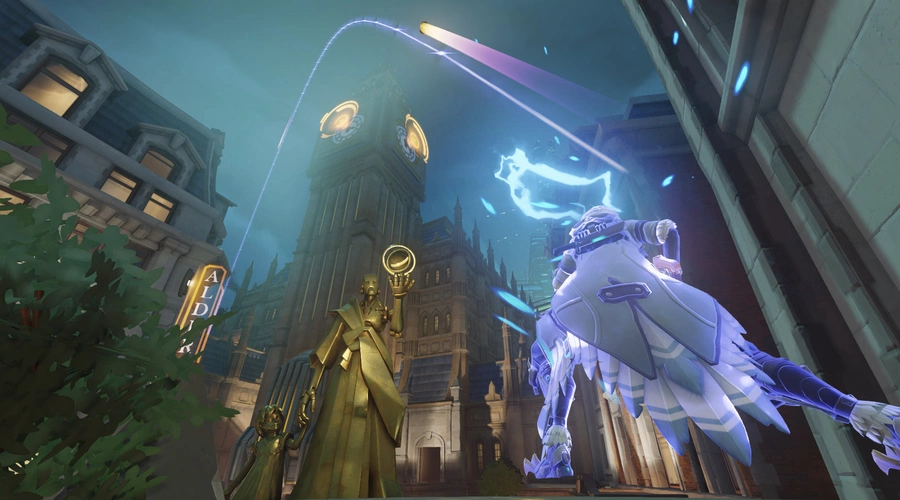
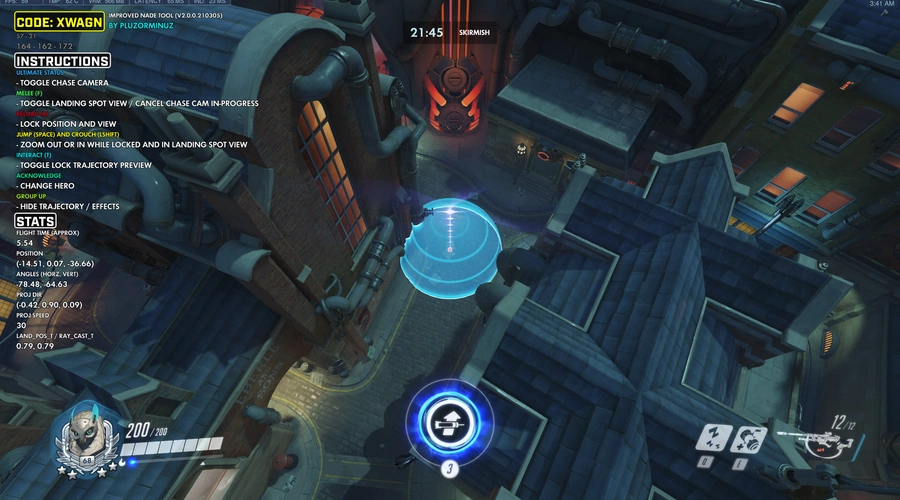
Improving upon Darwin's Nade Tool, this version includes smoother chase-cams, more accurate trajectories and sharper graphics!
This mode is designed for Single Player.
Supported projectiles:
- Ana
 : Biotic Grenade
 - Ashe
 : Dynamite
 - Baptiste
 : Biotic Launcher (secondary fire), Immortality Field
 - Hanzo
 : Arrows / Storm Arrow
 - Junkrat
 : Frag Launcher, Concussion Mine, Steel Trap
 - McCree : Flashbang, T U M B L E W E E D
- Mei
 : Blizzard
 - Orisa
 : Protective Barrier
 - Sigma
 : Hyperspheres, Accretion
 - Sombra
 : Translocator
 - Torbjörn
 : Rivet Gun (primary fire), Deploy Turret, Molten Core
 - Tracer
 : Pulse Bomb
 - Widowmaker
 : Venom Mine
 - Zarya
 : Particle Cannon (secondary fire), Graviton Surge
Controls
Melee
Toggle landing spot view
Ultimate Status
Toggle chasecam
Melee
Abort chasecam (during a chase)
Reload
Lock position and view
Jump
Zoom out in landing spot view, while position locked
Crouch
Zoom in in landing spot view, while position locked
Interact
Toggle trajectory auto-lock
Thanks
Toggle freecam
Need Healing
Toggle tooltips and stats
Group Up
Toggle effects (trajectory and range indicators)
Acknowledge
Change Hero

Toggle landing spot view
Ultimate Status
Toggle chasecam
Abort chasecam (during a chase)

Lock position and view

Zoom out in landing spot view, while position locked

Zoom in in landing spot view, while position locked

Toggle trajectory auto-lock
Thanks
Toggle freecam
Need Healing
Toggle tooltips and stats
Group Up
Toggle effects (trajectory and range indicators)
Acknowledge
Change Hero

Toggle landing spot view
Ultimate Status
Toggle chasecam
Abort chasecam (during a chase)

Lock position and view

Zoom out in landing spot view, while position locked

Zoom in in landing spot view, while position locked

Toggle trajectory auto-lock
Thanks
Toggle freecam
Need Healing
Toggle tooltips and stats
Group Up
Toggle effects (trajectory and range indicators)
Acknowledge
Change Hero
Toggle landing spot view
Ultimate Status
Toggle chasecam
Abort chasecam (during a chase)

Lock position and view

Zoom out in landing spot view, while position locked

Zoom in in landing spot view, while position locked
Toggle trajectory auto-lock
Thanks
Toggle freecam
Need Healing
Toggle tooltips and stats
Group Up
Toggle effects (trajectory and range indicators)
Acknowledge
Change Hero
Toggle landing spot view
Ultimate Status
Toggle chasecam
Abort chasecam (during a chase)

Lock position and view

Zoom out in landing spot view, while position locked

Zoom in in landing spot view, while position locked
Toggle trajectory auto-lock
Thanks
Toggle freecam
Need Healing
Toggle tooltips and stats
Group Up
Toggle effects (trajectory and range indicators)
Acknowledge
Change Hero
Source code
Loading...





4 Comments
Thank you for this, some of the buttons like Toggle chasecam , Toggle freecam, Toggle effects (trajectory and range indicators) dont work with the current ow2 buttons. Is it possible to give an update to this code?
OMG : fabulous. I loved the old one, but this is so so awesome !
This was amazing, thank you so much for this! A great improvement upon the older one, much easier to use too.
thank you! have fun finding nade spots! ^^