Path Node Builder

View original size
View original size

View original size

View original size

View original size

View original size

View original size

View original size

View original size

View original size

View original size
PATH NODE BUILDER
Build your own navigation network for your dummy bots. Compile the project into 3 vars: NodePositions, NodeConnections, DistanceMatrix. Copy them and paste in "MAP" rule. Then copy all rules and subroutines from EXPORT BLOCK and that all! You can use it in your PvE mods!
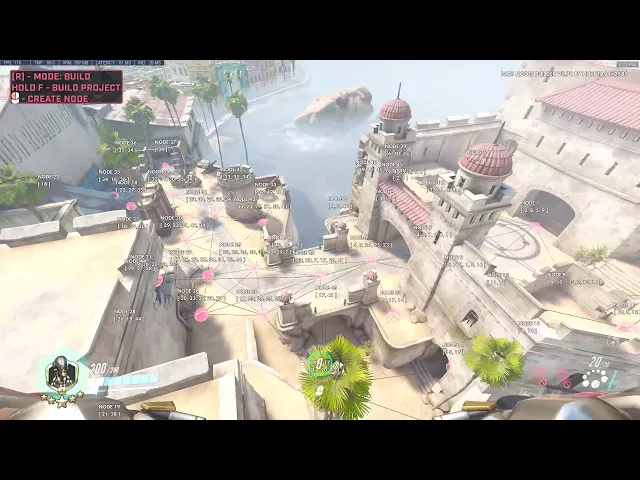
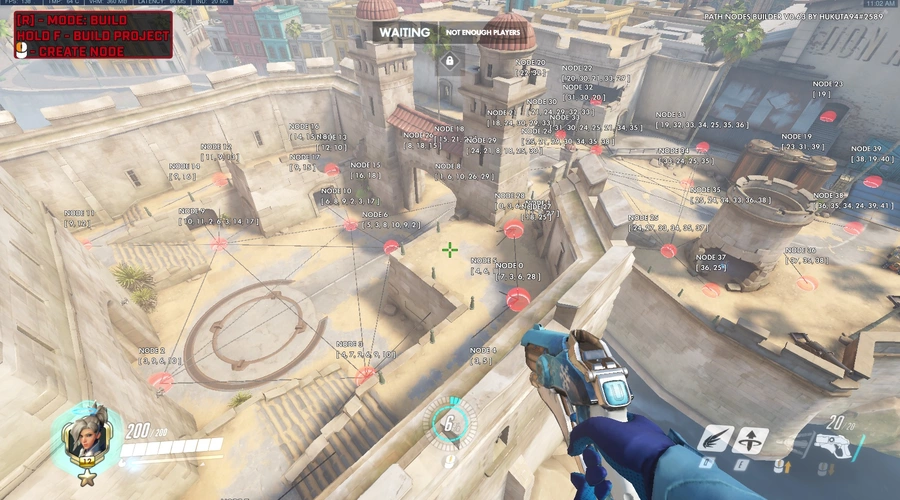
- Build mode: allows to create new nodes;
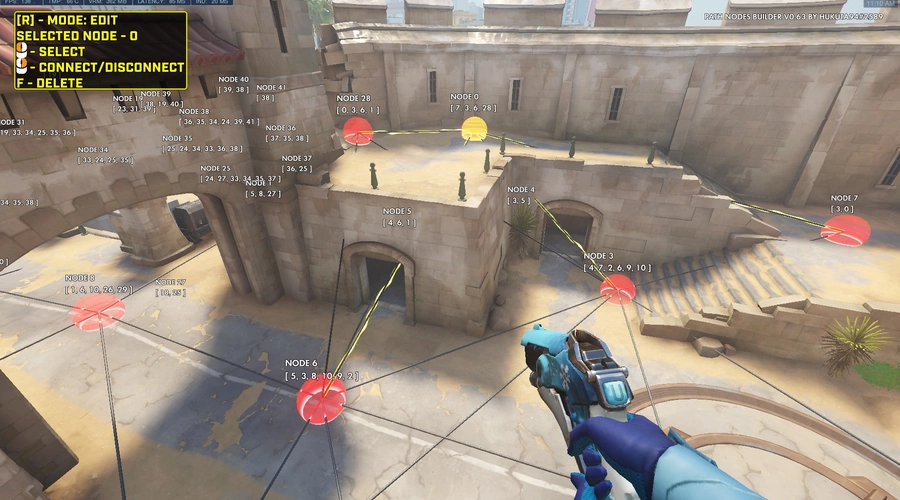
- Edit mode: allows to connect nodes and delete selected nodes;
- Path Finding: allows testing compiled navigation with a bot or with beam effects from the start node to the end. Also, you can boop bot to test his pathfinding in real-time.
Web-application to generate distance matrix rules to past it in workshop:
(not available now, please use desktop version) https://peaceful-cove-76019.herokuapp.com/
Desktop Windows application to generate distance matrix rules to past it in workshop:
https://drive.google.com/file/d/1DI_G8COmu9jP89FJkTqQ7aa4Q0q_80Z5/view?usp=sharing
Github web/desktop application open source:
https://github.com/HuKuTa94/path-node-builder
Created by HuKuTa94#2589
Players |
1 - 1
Categories:
Tools
Created at:
Last updated:
Current version:
1.0
Share URL:
https://workshop.codes/path-node-builder
Source code
Loading...





93 Comments
Desktop application for Windows has bean released!
Check out:
https://drive.google.com/file/d/1DI_G8COmu9jP89FJkTqQ7aa4Q0q_80Z5/view?usp=drive_link
Hello everyone! Sorry for long answer. I saw your feed back about web app. Unfortunally web hosting deleted my app. But! I decided to release desktop version. So you don't need to depend on web application anymore.
Desktop application looks like shit, but it will have only one button - compute matrix!
I will upload on file hosting distributives for mac and windows platform soon.
Stay by here for news!
Uploaded screenshot of desktop application on description page.
Been trying to use this on shamboli ministry but it didn’t let me compile the path nodes
Also the site isn’t working
The website doesnt work, hope you fix it someday!
I just wanted to let you know that your website is not functioning properly. I hope you see this and plan to fix the website. Thank you!
Hi there.
First off, I really like your work here. Very helpful stuff for people making PVE games.
I am having trouble with some of the bots getting stuck in one spot.
They still move around, but wont go to their target. I've tried adjusting their BotMoveSpeedMultiplier variable according to their actual speed, but no good.
I also turned ON the BotIsFollowTargetConstantly variable.
Is there a way to reset the bot? Idk I am kinda stuck here.
Thanks!
(Edit: Looks like I found a workaround for now. Hopefully it works lol)
Can you share your workaround? or is it to specific to your project?
i've got a question. How does the pathfind work? (lazy 2 read code sorry). I can't find any sources on pathfindings that use distance matrixes or any sort of explanation
I don't understand the question.
If you ask me how it to use, look the video in read description. The video a little bit deprecated (in case how to get result in your own game mod. For that you should read the text instruction on the description tab).
If you ask me how does it work. It based on computing distance between all points to any point. You use this mod to build paths then, copy results (not leaving and stopping the game) from inspector, then paste it in the web application to convert into distance matrix data.
Yo!! its me again, with the Zombie Game I'm making with your code. Check out my latest updates. Its so freaking awesome!!
Here's the link: ASBZ4 (N4ZI ZOMBIE ROBOTS)
When editing the page for your code, there is an option near the top which says "This code is a fork/uses other codes" when turned on you can enter this code in and your code will appear in the "derivations" tab of this code.
I figured it out recently....although don't play my mode, it has way too many issues
Hey bro, its me again, the one making the COD Zombie Game. I'm super excited to show you and this community what Ive been working on with your code. Check it out, I call it "N4ZI ZOMBIE ROBOTS".
Here is the code: QCNX3.
Its still not done, I still have to add the second floor, and eventually the roof. I would really like your feedback and any tips you might have. And if you or anyone else reading this want to collaborate and add on the code, that would be awesome.
Hello! Very nice idea and implementation! I suporse it is an early prototype to test base mechanics? Seems it works very well!
I have some improvements advices:
Right now, I'm just focusing on unlocking the second floor and roof, which is harder than I thought.
I'm stuck in a part of your code. You have or had on option to slow down the bot walking speed. When i slow down the walking speed, the bots will prematurely pick another node to walk to before reaching their previous designated node. Is there a way to fix that?
Hello,
I was curious if you were doing optimisations to the arrays, I learnt recently that large arrays existing in a mode can cause server performance issues. (which is one of my main problems right now)
The second problem is more of a problem that I have to figure out myself, but I am very close to the element limit, so if you are making changes to how the pathfinding values are stored, will it help with lowering element count?
Hello! You ask great questions! I suppose you try make a big pathnode matrix (such like full area of escort maps)? This can be a problem. Path-node builder provider good performance for 60-70 pathnodes on the map.
I thought about these issues. To solve element limit you can make new inport code for one map only.
I agree about arrays. That can be so massive and heavy for big maps. I tried to encode distance matrix in string, but it does not support very long strings. To solve the problem need way to store all data about 200 nodes and it must have good performance.
Thank you for the response.
I actually am using what your recommendation is for good performance, I have been trying to find ways of minimising the load on server performance.
To give a bit of context, my mode is a PvE mode that has custom abilities and upgrades for both sides, as well as common performance eaters like large revaluating huds.
I am trying to cut down on these problems so I went to the source of my largest arrays.
Thank you for your input.
very glad you made this! i'm too lazy to code these.
However, i noticed that (i.e. on Hanamura), when you delete nodes, the in-world text for those deleted nodes teleport under the floor in capture point A. is this bug?
Hi! World text must be deleted together witn node. I never tested the mod on this map. I have to check it
Yoo, awesome job with your Version 1.3. Awesome stuff!
Im making a really cool C.O.D Zombie game. Heres the scenario, you are a simple Mercy Hero with only a Handgun, you are barricaded inside Eichwendale Castle that you cannot escape. And you have to defend yourself from incoming waves of zombies that get harder and harder each round. The Zombies spawn from all around the castle and they have to break through your door barricades to get to you and your team. Also, as a Hero, you can collect money and buy Hero upgrades like a Mccree/Soldier/Bastion. Also, just like in the COD Zombie game, you can get the equivalent of "insta kill", as a "Nano Boost", where all Heroes damage is upgraded to half the zombies health. LOL
I'm pretty sure you answered this on your instruction video but I cant find the answer. How do I make the bot chase me. I only ask because Subroutine.BotStartPathFinding is not there anymore.Im trying to create a code where the Zombie will use "Node Path Finding" to find you, and IMMEDIATELY abandon N.P.F when the zombie has L.O.S on you.
Hi! The instruction video is deprecated now. Really, I removed some subroutines. I want to record a new instruction video, but I am so lazy))
Easy way to make bot chase the player just to set him var BotPlayerTarget. Also, you can set BotIsFollowTargetConstantly = True. This boolean means the bot will be chasing the target player forever until dead. It also can be actually useful for melee bots.
Hey thanks for the reply. I ended up making a follow rule from scratch. And it seems to be working well.
Pretty much I made two rules. 1) If Enemy Hero is in LineofSight (LOS) = true, then resetpathfinding and follow character using LOS. 2) If LOS is false, then switch back to node path finding.
Also Im creating another rule to solve Zombies getting stuck. The rule is If Zombie Bots speed < 3, then try jumping/melee 3 times, and if that doesn't work, teleport the zombie to last node or starting node.
> Pretty much I made two rules. 1) If Enemy Hero is in LineofSight (LOS) = true, then resetpathfinding and follow character using LOS. 2) If LOS is false, then switch back to node path finding.
Right. Path-node-builder just provides AI navigation, but how to process targeting it is your task)
>Also Im creating another rule to solve Zombies getting stuck. The rule is If Zombie Bots speed < 3, then try jumping/melee 3 times, and if that doesn't work, teleport the zombie to last node or starting node.
You need to set var BotMoveSpeedMultiplier. By default value equals 1 which means a bot has a movement speed of 100%. If you need to reduce speed, for example, set 70% movement speed and don't forget to set BotMoveSpeedMultiplier = 0.7, etc.
This issue that I want to solve in the next updates, but I don't know how yet.
Hi everyone! I released a new version 1.3! Check out the update log and reimport code!
There is no longer a build option (edit: compile option*), so I can't test with the bot nor export the variables. Am I doing something wrong?
No. This feature was removed from workshop mode to web app in 1.0 version.
my mistake, I meant "compile option" in the first comment
so... how exactly do I use this tool now? I'm quite lost. Since I can't copy variables, what do I paste into the web tool?
Instructions:
PROFIT!
to be more specific, all of the compile-related rules and subroutines are disabled. should I just enable them? since there is no other way of getting the node positions and connections
unfortunately, these disabled rules are legacy. Since a few last updates, path-node-builder was modified so much (method of storing values in distance matrix, getting values from these vars).
Why it was done?
For example. Before distance matrix calculated like this:
0 1, 2, 3, 4
1, 0, 1, 2, 3
2, 1, 0, 2, 1
1, 3, 2, 0, 1
1, 3, 2, 1, 0
We have more duplicated data (below 0 diagonal)
In version 1.0 web app calculates it like this:
1, 2, 3, 4
1, 2, 3
2, 1
1
But can build uni-direction nodes with a different distance value.
The last version of the web app calculates it like this:
1.001, 2.002, 3.001, 4.003
1.001, 2.003, 3.003
2.002, 1.002
1.001
Also was reworked export rules of AI pathfinding.
P.S. I have to remove disabled legacy rules in the next updates.
since there is no compile button anymore, there are no variables to copy. Node positions and connections are both empty
Found a problem where bots will be stuck in place walking back and forth.
This happens seemingly randomly when stood still in a corner and the ai is right on top of you
https://www.youtube.com/watch?v=ITWffXSbZTo
Also, can you show me the path nodes and connections of this place?
Code: E7M44
Can't copy paste actions
Some nodes are leading into teleports set out in my mode, so some may connect in weird ways
(note: this code only has the rule for the kings row map)
I released version 1.3. Added feature for melee-only bots. You can set flag for variable "BotIsFollowTargetConstantly". It is useful for bots who use melee attacks like zombies etc.
Maybe it can fix stuck bots in your mod.
"Some nodes are leading into teleports set out in my mode, so some may connect in weird ways"
It could be a possible reason for the problem. If you need to create teleports you should add additional logic over this and don't use node connections.
Try to remove these specific connections from node 59 to node 60 and recompute the distance matrix.
In PvE mods, you should use path-node-builder only for reaching the target position/player of a bot.
HI! Thank you for your video report. I think this problem exists for melee bots (who must chase a player and hit him by a melee attack). I have some ideas on how I can fix it in the next update: if target is a player, the bot must follow him permanently.
Hi everyone! I found and fixed a critical bug. Please, reimport the code or code snippet. Check update in change log
are you able to visualise what this fix does?
[I think I have answered my own question, I had a node designed to stop people from abusing some of the enemies lack of movement abilities (on top of a tall stack of boxes found on the kings row map/s) what would happen is the enemies with a lack of vertical movement would try their hardest to get to a node that they couldn't actually reach. My fix for this before was to reset the ai whenever they had vision of you.
Now, I didn't need to reset the ai for a bug which caused the ai to get tunnel vision on a very specific node.
What happens now is when they do try to "save" time going over a pile of boxes, the player only needs to move to a different spot for them to correct themselves]
Also, I needed to use the web app on my maps again because they had some broken parts (note for anyone using this code)
The problem was in the float value in the distance matrix. I combined values for distance from node A to node B and from node B to node A in one float number.
Early these values were stored as 1,4. It means that distance from node A to node B equals 1 unit and distance from node B to node A equals 4. It perfectly worked for distances below 10. But if distance equals 10 like 1,10 the float number was parsed to 1 instead of 10 and the bot looped between two nodes.
I fixed this issue by changing the method of storage of these values. Now 1 and 4 distances collapsed to 1,004 float number. Now all numbers can be parsed correctly
Btw, it increased a little bit performance.
Hi everyone! Check out the new high-performance version 1.1 with fixes!
characters such as genji seem to get stuck on a node for a second before going to the next one.
is this a problem with the speed multiplier?
I have determined that if any movement changes are made, the variable for bot movement multiplier needs to be set to, speed/100.
Main thing is that hero’s with a unique movement speed (such as genji) need to somehow be accounted for.
Yes, you are right. This is one of the compromises of new high-performance pathfinding. Also, you can play with the coefficient in the subroutine "compute timestamp". I set it to 5.4 on average for all heroes but Genji has speed a little bit more.
Maybe in the future, I will make the bot speed more independent.
I could just add a check within "compute timestamp" to check for genji and tracer, I think I know the value you are talking about so I could just put an if-then-else action within any actions that need the speed.
EDIT: I was wondering if you need to do anything different for starting pathfinding on a bot
To start pathfinding you just need to set one of two vars: BotTargetPosition or BotTargetPlayer
Hi mate, is it still possible to do it the old way? I am on Switch and don’t own a PC anymore, im just hoping I can still do it on console…
Unfortunately, you can't build a distance matrix inside of the workshop mod. You also need to use the web app to compute all variables then import them back into the mod.
sometimes BuilderNodeConnections isn't showing in the inspector.
Something like this:
https://docs.google.com/document/d/1rf-yUM0oYYQE8R0H-GfIlWWlYRL0FLmSb8XDl8fva6U/edit?usp=sharing
I had made a mode using an older version of this tool, the pathfinding is slightly different and my mode consists of mainly melee bots. The problem is that sometimes the bot will walk to a node and not stop until either it has reached that node or it has fallen off the edge of the map.
I was wondering if there was some way of getting around the bots need to run from you for no reason, I have made a separate version using the new pathfinding and although it works, the old pathfinding would be more consistent with being in your face.
I am simply curious on why this may be the case, also the strange walking until they die thing is a problem.
Hi! I work on the update to solve this issue. I got some good results, but I still, need to fix some pathfinding bugs including falling off the edge of the map.
I improved AI in the WIP version it gives bots more brains that don't come back to the previous path node if it can reach the target/player. Btw I try to improve bots for melee-oriented PvE mods
How can I edit some pathfinding ive already made? I built it in the web app and imported back to test but cannot edit any of the nodes?
You need to apply the whole cycle of the path node building.
I'm pretty sure I did this by following the instructions right?
Wait... Do you ask me about editing of existing nodes on the map? It's impossible. Only one way to edit a node's position: to delete it then to create a new node and rebuild the distance matrix by the web app
I work on update 1.1 with improved pathfinding and performance.
I have plans to rework the distance matrix storage way. It is a 2D array that takes many workshop elements. The reason why the path node network can't be applied on the full map is the cause of the "Large script" workshop error.
After release 1.1 I will work on the 2.0 version to resolve this problem. I want to code distance matrix and node connections into an array of strings. It can reduce the usage of workshop elements and allow build a path node network for a full map.
And the most important now. I need your feedback, need your experience using the mod and web app. You can leave it below under my comment.
Thank you! I hope I make a nice mode.
The ai seems to have trouble with doorways when their destination is up high (specifically on havana using a slightly modified version of your example setup)
trying to set the start position outside of the little building with a broken wall on the second story, and the end position on the second story of that building.
The ai seems to think walking back and forth between node 22 and node 25 (you know which ones these are because again I am using your example setup for a base)
is how they get up to the second story.
Not entirely sure what is causing the problem as the bot should recognise the path required
Did you ever get anywhere with this bug?
Thank you. I know about this issue. I think this bug exists in the web app. I will check it
I'm so excited! I've been waiting for the update and I'm so excited to try to work on my project. Thank you!
Hello everyone! I am glad to present you with my web app for the computing of distance matrix! Check the update log!
Hello everyone! I know about the server crash issue. It happens after the patch of server "optimization". The Path Node Builder is unstable now.
I decided to extract compile logic into my own project and publish it as a web app.
You will need to copy-paste all variables into input text field, press the button, and get the result: these same 3 vars.
Also, I worked on AI navigation improvement and optimization.
Is the web app available now or are ya gonna announce it when its done?
Hi! The web app is available now! Check out update log!
Ya might have to make a video on it, cause I'm having a hard time on instructions 4 through 8.
Edit: Well now I think I got it right, I did a small test. I got the value 7 and copied the variables to the new rule, but not sure what to do with the 7?
Another Edit, lol: I don't know what I did different this time, but now I got the result that I am 100% sure I'm supposed to get, thanks. :)
I have a plans to record video.
I couldn't wait to share the news, so I decided to publish a new version without video instructions ))
Web app is in development at the moment. I will notice in the log when it is ready
ok i will test this later again
also dont forget to put this on the update log
Hi! Check out the new version!