
True Dynamic Pathfinding

This code is over 6 months old. The code may have expired and might no longer function.
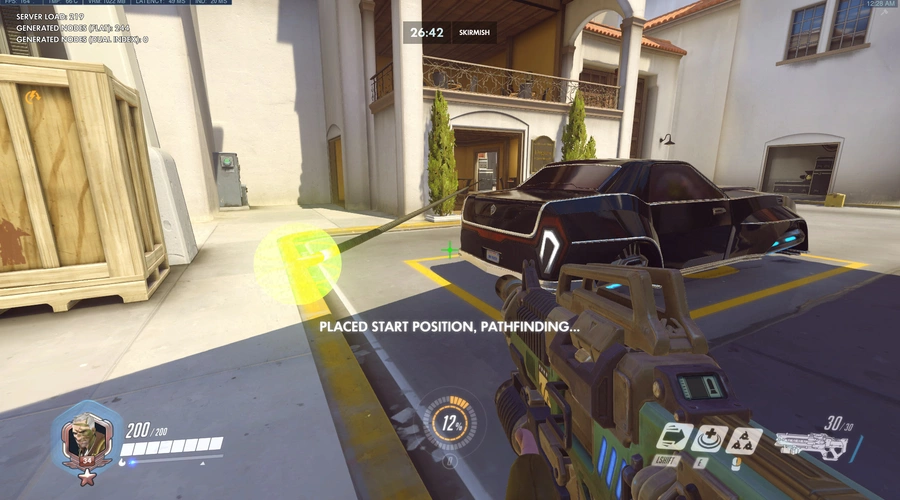
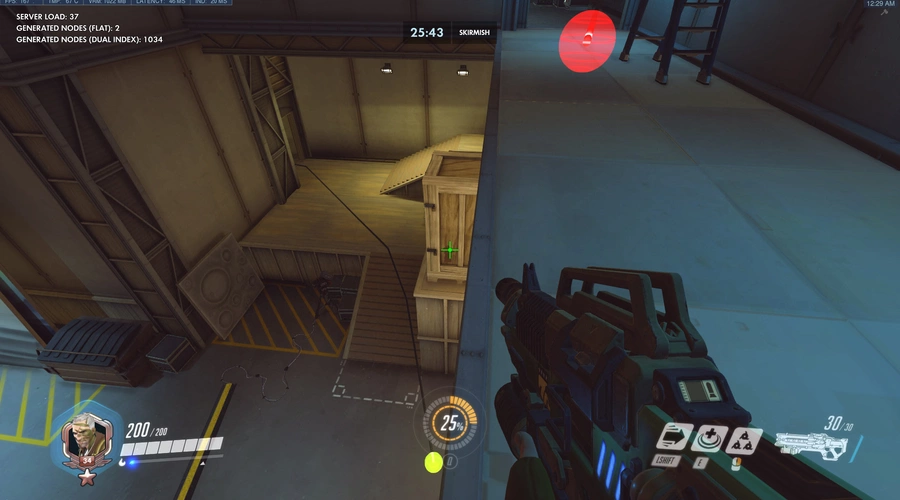
Pathfinding Without Pathmaps!
A proof-of-concept for a dynamic pathfinding system implemented in the Workshop that can theoretically find the shortest path (or something close) between any two points on the map, as long as one exists. It does not require any pre-made pathmaps or anything of the sort, which means it can be used on any map, though some work better than others. The path can go around obstacles, up or down stairs and it will still be found. It can even (usually) find the way from a low ground to a high ground position. It's not perfect, and is quite slow, but unfortunately I don't think the speed could be improved much due to the performance constraints of the Workshop.
It uses the A* pathfinding algorithm normally, but switches to the faster Greedy Best First Search for long distances (>75m), which means it will not always find the shortest path at long distances.
How to use:
- Walk to some position in the map.
- Press Interact (F) to specify the end position for pathfinding. This will be the position that the algorithm will attempt to find the path to.
- Walk to some other position in the map.
- Press Interact again to specify the start position. This will be the position that the path starts at. Once this is done, the algorithm will try to find a path between the two points. If it succeeds, a path made of grapple beams will appear between the two points specified. If it does not, the server will probably crash.
Please comment if you need help with anything, or anything else I guess.
At the top right there are a few HUD elements.
"Server Load" is the current server load value. If it stays above 200 for more than a few seconds the server will probably crash.
"Generated Nodes (flat)" is the amount of nodes generated by the algorithm in the current or last run IF the amount is less than or equal to than 1000. If it's greater...
"Generated Nodes (dual index)" is the same as above, but when the amount is greater than 1000. The reason for this is hard to explain, so I might do it in an update or smth idk.
Also, use the code KQBEH for the debug mode version, which will highlight every node generated by the algorithm with orange spheres.
If you want to use code from this, please credit me. This is written in OSTW, and i'll probably release the source code soon or if someone asks me to, so if you want to use this, I'd recommend just using the OSTW code, or just asking me about it if it's not public yet. Have fun I guess bye
UPDATE: source code (library version) available at https://github.com/kxtbit/OWWorkshopDynamicPathfinding/blob/main/astarpathfind_reduced.ostw
Controls


Source code
Loading...







14 Comments
i've been wondering, how would this work for bots? i went to this a few times over the course of past few months, and each time, i tried to import it into a single bot (i just wnat it to go to the enemy with dynamic pathfinding), but i kept failing to understand the code, soo yeah..
well, this system i made isn't as batteries-included as something like, say, OSTW's built-in pathfinding, where you pathfind directly on a dummy bot and the library does the rest of the work for you. instead, the way this pathfinding system works is by directly supplying a start and end position - in your case, the current position of the bot and the target position respectively - and it will output a list of positions representing each point in the path it found. from there, you'll need to make your own system to get the bot to walk to the first point of the path and then keep going to the next point when it reaches the first until it reaches the end. i might be able to hack together some OSTW code of that for you if you need help with that.
it's also worth noting that this system might not work well on more than a few bots at a time - dynamic A* pathfinding is REALLY taxing on the slow workshop servers and can already take quite a long time for just one bot, but more than one bot pathfinding long distances is definitely stretching it. additionally, because of OSTW's function semantics and the fact I chose not to make the pathfinder function a subroutine, the entire system will be inlined anywhere you use it, potentially making your element count explode if you use it more than once in your code.
but it'd be worth a try to see if i can import it into a bot, the only part i'm stuck on is... understanding your code 😭 you are so good that your code is too complicated for me to understand
the OSTW pathfinding requires you to make a pathmap beforehand, so it's not dynamic. using the pathfinder function shouldn't really require understanding the algorithm itself, since most of that stuff is kinda abstracted away. for a basic demo of a pathfinding bot, see this gist i made: https://gist.github.com/kxtbit/89a387411bcea10506f93f984717885d
the bot will spawn 10 seconds after you spawn, and you can press crouch + interact (ctrl + f on default bindings) to make the bot walk to you using dynamic pathfinding. it isn't perfect; the bot can sometimes get stuck forcing you to press the keybind again, and i sort of hacked this code together, but hopefully that can be helpful to show you how to implement my buggy pathfinding system into a gamemode if you wanted.
I'm a bit late lol but would it be possible to get a workshop code for this cause I don't use OSTW and I'd love to try it for myself
thank you so much for the reply! i see, i kinda figured that out. but i did not know OSTW has its built in pathfinding? but is it dynamic? the only true dynamic pathfinding i could find was this one ^^
Bro, i gotta commend you, this is awesome. So simple, clean, and FAST.
We should collab some day. I made a zombie game concept, but after the OW2 update, it messed up bots path finding. Maybe we can work together in fixing the game. Check out my game and let me know what you think.
Code: GWRH3 (Zombie Robots)
Nice idea. One more implementation of the pathfinding in workshops. Sometimes it works stranger but I think it fixable.
https://i.postimg.cc/zX75jdQj/image.jpg
If it will low-required performance for a lot number of bot this tool can become very useful and low cost for PvE mod developers.
I develop the path-node-builder mod, but it required store some data for usage by bots. Here the code: QRD5A
Your idea is pick around walkable positions with some step (for ex. 0.5 meters) and apply A* algorithm to find the closest position to the target? Or does it works a little bit complexity?
the thing with the going through walls and floors i'm not entirely sure of. it's probably an issue with the path refiner (tries to remove unnecessary points in resulting paths). my best guess is that server-side raycasts are done on a simplified version of the map geometry that may not have entirely correct collision. it seems far fetched but it's my best guess, because i'm fairly sure that i coded my collision checks correctly. if this happens a lot, which it can on some maps, it can sometimes help to disable the path refiner, maybe i should make a workshop setting for that. EDIT: done
also, it doesn't use walkable positions. what it actually does is when it selects the neighbors of the grid nodes, it does a line of sight check to the neighbor direction plus 0.25Y. if this succeeds, then it chooses the position of a raycast pointing down from the position that was previously checked as the position for that node on the grid. i should note that line-of-sight checks are done with raycasts instead of Is In Line Of Sight because it seemed to be more accurate.
also, about the performance - the test code that i put here (not the github library version) has the default wait threshold set to 12. it is pretty fast but it also essentially consumes the entire server capacity while pathfinding. however, setting it to 5 will in my experience, decrease the server load to the point where it will not usually go over 100, so pretty good performance. in addition, the debug mode version is not good for gauging the performance, because creating the orange spheres generates a ton of extra server load, so the wait threshold is set to 3 instead of 12 in the debug version, so keep that in mind.
How
it basically does A* pathfinding along a 2D grid that's overlayed over the 3D space - that is, one position in 2D space could correspond to 2 or more grid positions, to account for the 3Dness of the real environment. it also has a sort of debug mode that can be enabled to show all of the grid cells that are explored by the algorithm, but it's not included in this gamemode - let me know if you want to have the debug code so you can see it more in depth
sure
KQBEH
here, this code is for the debug mode version
all of the nodes generated by the algorithm will appear as orange spheres
if the spheres are disappearing, it's because there's a limit to the amount of orange spheres that can be visible at once (to not go over the workshop effects limit), so it has to remove older ones, and that's why they disappear
big