
Aim Strafing Trainer

View original size
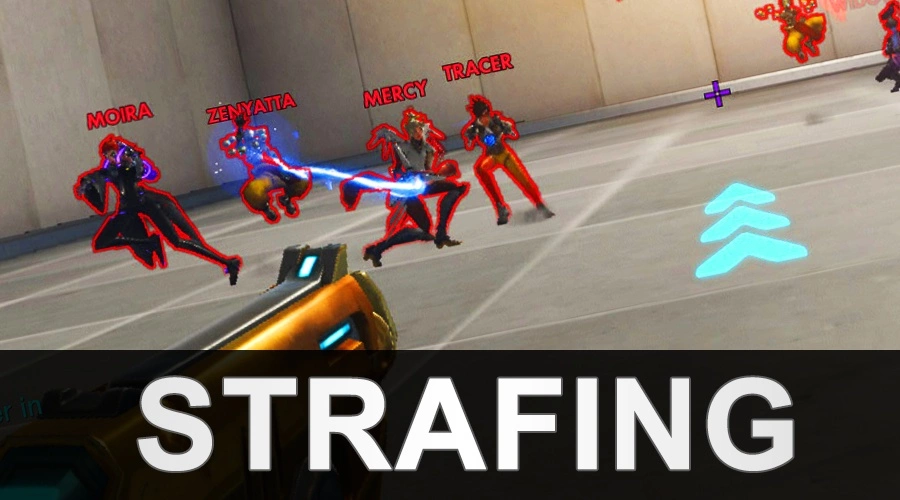
Aim Strafing Trainer allows you to practice tracking and scale the movement pattern to mimic real player movement. Everything is customizable and exposed you can change how quickly they dodge, modify heros that are spawned, change jumping frequency, simulate ability useage and so much more.
Useful Information:
- I need healing changes your hero
- Press Interact on the infinite ammo sphere to use it
- Works with every map you are not binded to workshop chamber
- Configurate bot movement patterns by navigating to Settings > Workshop Settings in the custom games menu. Full documentation is below explaining every setting.
Created by Mightyy
Special thanks Bloomer for some of the ideas

Configure your settings using workshop settings menu to make it as easy or as hard as you like

| Documentation |
|---|
| Bot Movement Change Strafing Max: Sets the maximum movement direction time |
| Bot Movement Change Strafing Min: Sets the minimum movement direction time |
| Bot Randomly Crouches: Can the bots crouch? |
| Bot Randimly Jumps: Can the bots jump? |
| Bot Spawn Count: Sets the maximum spawn number count for bots |
| Crouch Chance: Defines the frequency of how much a bot should crouch 0 = Always 1 = 50% chance 10 = Unlikely |
| Jump Chance: Defines the frequency of how much a bot should jump 0 = Always 1 = 50% chance 10 = Unlikely |
| Bot Health Scale: Sets the health max scale of the AI bots use 100% for default |
| Bot World Size Scale: Sets the scale size of the bots in world space use 100% for default |
| Bot AI Settings |
|---|
| Ashe Scope Frequency: Sets the frequency that the ashe bot should simulate scoping in |
| Genji Double Jump Frequency: Sets the frequency that the genji bot should double jump |
| Unpredictable Panic Turning: Should the bots simulate panic 180 turning to hide head hitbox |
| Bots Shoot / Use Abilities: Should the bots shoot and simulate ability usage |
| Lucio Uses Speed Boost: Should lucio use speed boost |
| Mercy Uses Valk: Should mercy fly around sometimes with valk ultimate |
| Widow Uses Scope: Should widowmaker scope in sometimes |
| Player Settings |
|---|
| AI Outline Color: Overrides bot outline colors in game |
| HUD Theme Color: Allows user to customize the base hud coloring in the mode |
| Ultimate Give Type: Sets the ultimate grant type between "Always Give Utlimate" or "Give After Kill" |
Players |
1 - 4
Categories:
Practice Mode
Created at:
Last updated:
Current version:
2.0
Share URL:
https://workshop.codes/aim-strafing
Source code
Loading...





15 Comments
It's the best code for traning,but I would like to ask when you can add new heroes to update the code.
How come whenever i kill a bot it just respawns as the same one, how can i make it so it always randomly spawns a new hero?
How come this isn't showing up. I copied and pasted the code into overwatch and it doesn't work. Is overwatch 2 broken or something?
Should be working fine, I've still been using it since ow2 launch. There's a few bugs that were introduced though such as dva mech not ejecting etc
Whoever made this code is a genius programmer. I'm honestly learning more than I do when playing against real people. I have used this every day since I found it several months ago. Additionally, you can move to any map you want (in the older version that I have), because this genius programmer somehow made sure you and the AI move to a good spot. I've tried that with other workshop codes and it never works this well. Thank you so much to the developer of this code!
Cheers, yeah theres alot of code written to make the AI good. If you like a9fbx you might like my own standlone aim trainer on Steam.
https://store.steampowered.com/app/1332220/Mightyys_FPS_Aim_Trainer/
All the best,
Mightyy
It looks interesting, I like how customizable it is. I'm looking for some very specific features, can you tell me if your aim trainer has them?
The option for 100% predictable targets (no sudden changes in direction or speed).
If I miss a target, I want that target to be repeated over and over until I get it right (guess this mostly applies when flicking on stationary target).
I want to be able to choose minimum and maximum distance for targets (for instance if I want arm aiming and not wrist aiming, I can adjust it to my needs)
Able to set "relative aim sensitivity when scoped" to what I have in game, like you can in 3D aim trainer.
Thanks for fixing the pharah thing! Good luck with your standalone aim trainer!
the best one so far , but we want heros Threats like in code: kave5 and high ground and some wall
I'm a T500 Dps and futur contender's player's and i will say it's
Probably the best workshop mode for training aim, specifically strafes.
I'm training on it pretty much everyday.
Just because you can change the strafes bpm of enemy like 0.100 min with 0.500 max so the bots will alternate between this range of the bpm you typed. ( So it's unpredicatable ) And it's perfect for mimic player's unpredicability, so you can improve u're aim ( mouse control ) to hit hardshot.
The only flaw for the moment is that there is not enough verticality. Like training on other maps with high ground or behind walls, pillar for peeking.
And I would like to see diagonals on it's bots like backward strafes not just A D. Its going to reinforce the mimic a player :)
In short good workshop mode, wp to the creator.
I'm not the developer, but if you have the old code, you can move to any map you want. I have the old code and I like to practice on Eichenwald and Numbani for exactly the reason you mentioned. The code will move you the place where there is high ground and cover, and you can practice vertical aim and peeking.
the effects like stun it doesn't look like i'm feeling it, like mc cree, i don't know what happens, but it's like a delayed effect and the stun itself doesn't work as it should
SPEED UP %?
Hi I've added Movement Speed option to the bot configs. You can view the update logs below to find this change or check out the small video to find the new option.
Thanks for the suggestion
https://www.youtube.com/watch?v=V7drsXyP0gE
Nice work!