Junkrat Spots Visualizer

Disclaimer: Due to the early development nature of this code, bugs and crashes are possible. If you are experiencing any code problems, feel free to report them in my discord server: https://dsc.gg/johnjunkrat
Terminology
- Spot: A point of interest where the player can stand on and use Rip-Tire
- Stall: A point of interest where the player is stationary like a spot, but not able to use Rip-Tire. Stalls have a "stall timer" which give you an impulse when you're "in the air" and "not moving" for too long (around 3 seconds). This can be circumvented by slight movements.
Abstract
This code serves as visualizer for Junkrat spots/stalls for all maps in rotation, excluding Clash and seasonal maps. These maps are disabled by default.
Future Roadmap
- Additional Spots
- Movement Recorder
Highlighting Spots
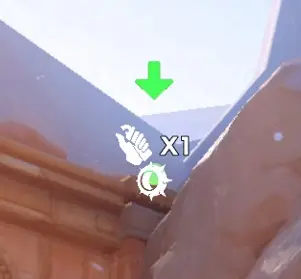
You can highlight a spot by holding down [INTERACT], which acts as a "cursor" to help you navigate between all the map's spots/stalls. The highlighted spot will always be the closest spot to your reticle, regardless of LOS (Line of Sight).
When highlighting a spot, several icons will show up that help indicate:
- How many Concussion Mines are needed to achieve this spot/stall
- If you can use Rip-Tire
Here is a preview of the Workshop implementation for "Highlighting Spots":
Preview Spot
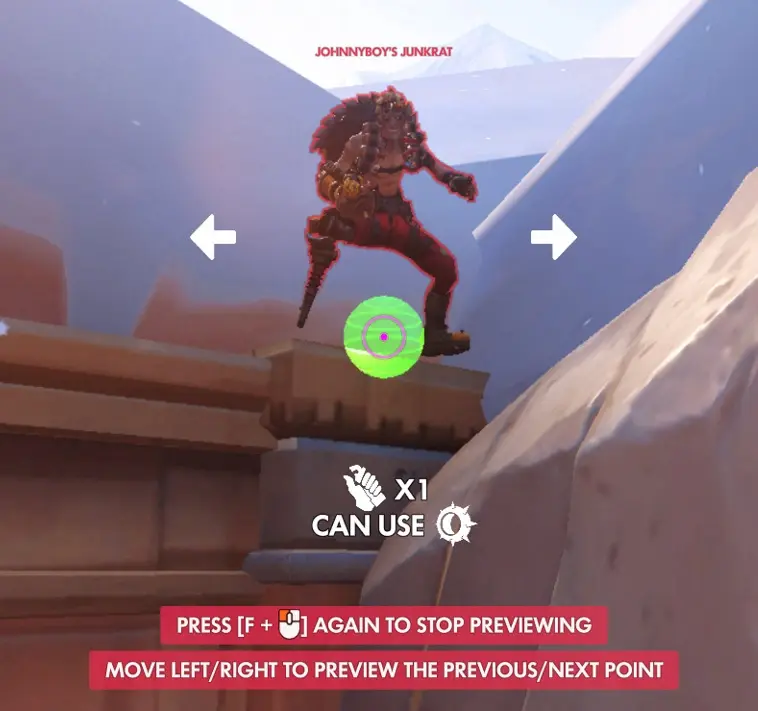
Previewing a spot allows you to see the achieved spot using a Junkrat Dummy. Your camera will be set to the previewed spot. The spot that is currently highlighted becomes the previewed spot.
Previewing a spot also shows the same information as spot highlighting, as well as if the player is required to crouch. Moving LEFT/RIGHT will preview the previous/next spots respectively, which the arrows on each side signify.
Here is a preview of the Workshop implementation for "Previewing Spots":
Teleport To Spot
Teleporting to a spot allows you to be in the currently highlighted spot.
If you teleport to a stall, you will be frozen and prompted to move to unlock your movement. This helps with staying in stalls as they can be tricky. This frozen state may be finnicky with the "stall timer" mentioned above.
If you teleport to a spot that requires crouching, you will be forcefully crouched temporarily and prompted to hold [CROUCH].
Edit Mode
Edit mode is intended to be developer-exclusive as it's used to create map data, so no documentation will be provided. However, you may enable "Edit Mode" by setting the "Edit Mode" boolean in "Workshop Settings" to true.
Other Features
- Third Person: Changes your camera perspective to third person, which can help with visual clarity.
- Spectator Mode: Allows you to spectate other players.
Controls
 +
+
 +
+

 +
+
 +
+

 +
+
 +
+

 +
+
 +
+
 +
+
 +
+

 +
+
+
+
 +
+
 +
+

 +
+
+
+